缘起
经常会遇到这种场景:手头有个打包好的 ios.ipa、一个 Windows 安装包,或者一份临时构建产物,要发给同事或测试同学。微信传大文件要压缩、要等转存;网盘要登录、要等审核;scp 对方又不一定方便。
我想要的其实很简单——把本地某个文件夹,用一条命令变成一个固定的公网 HTTPS 链接,对方点开就能下载,我这边关掉就收回。
于是有了这个小工具:一个叫 http 的 bash 脚本(我给它配了别名 h)。它做的事情就两件:
- 用 Python 自带的
http.server在本地起一个静态文件服务; - 用 Cloudflare Tunnel(
cloudflared)把它映射到一个固定域名share.taowiki.com。
没有 Dockerfile、没有 nginx、不用买服务器、不用开公网端口。本地 h start,对方就能访问 https://share.taowiki.com。
为什么是 cloudflared 命名隧道
实现一个「本地转公网」的方案有很多:ngrok、frp、localtunnel……我最后选 Cloudflare 命名隧道,原因是:
- 域名固定。
trycloudflare.com那种临时隧道每次重开都换一个随机子域名,发出去的链接第二天就失效了。命名隧道(named tunnel)绑死在自己的域名上,重开不变。 - 免费、不限速、自带 HTTPS。证书是 Cloudflare 签的,对方浏览器不会报警告。
- 不开公网端口。
cloudflared是主动出站连到 Cloudflare 边缘的,本机防火墙一个入站口都不用开,安全性比 frp 反向暴露端口好很多。
代价是要先做一次性配置:cloudflared tunnel login,建一个命名隧道,把域名 CNAME 到隧道。配好之后,日常就只剩 h start / h stop 了。
怎么用
最常用的就两条命令:
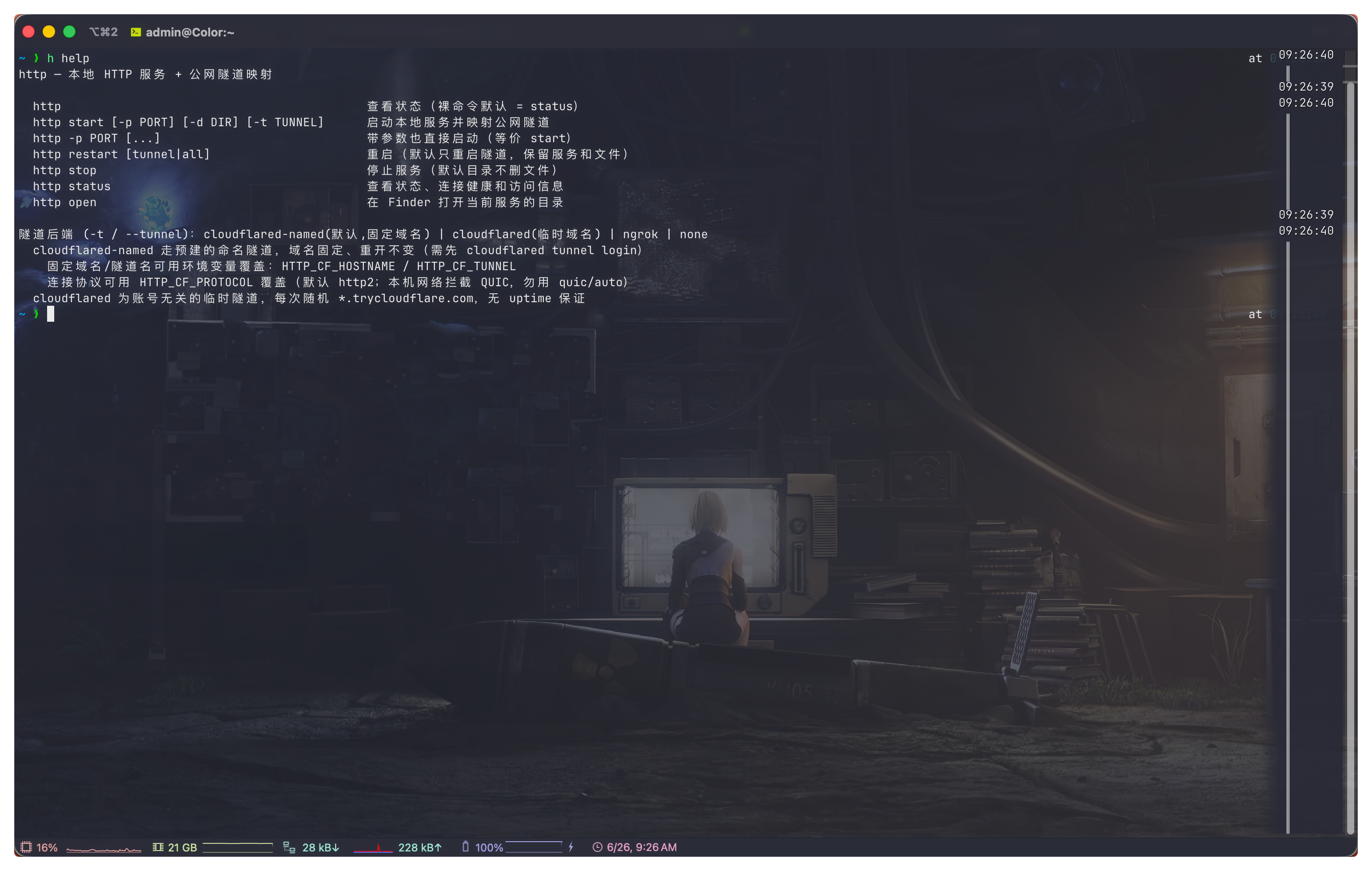
h start     # 启动:起本地服务 + 映射公网域名
h           # 看状态(裸命令默认 = status,不会误启动)
启动后输出长这样:

• 启动本地 HTTP 服务 …
• 启动 cloudflared-named 隧道 …

  HTTP 服务已启动
  本地地址   http://127.0.0.1:8000
  公网地址   https://share.taowiki.com
  服务目录   /Users/admin/http-share
  隧道后端   cloudflared-named (protocol=http2)
把要分享的文件丢进 ~/http-share,对方访问 https://share.taowiki.com/ios.ipa 就能下。
完整命令表:
| 命令 | 作用 |
|---|---|
h / h status | 看状态、边缘连接健康、公网实测 |
h start | 启动(默认目录~/http-share、默认固定域名) |
h restart | 只重启隧道,保留服务和文件(掉线时用这个) |
h restart all | 连本地服务一起重启 |
h stop | 停止(默认目录不删文件) |
h open | Finder 打开当前分享目录 |
start 还支持换端口、换目录、换隧道后端:
h start -p 9000              # 换端口(默认 8000)
h start -d ~/some/dir        # 指定分享目录
h start --temp               # 用随机临时目录(stop 时删,适合一次性分享)
h start -t cloudflared       # 改用临时随机域名(不用登录)
h start -t ngrok             # 改用 ngrok
h start -t none              # 只开本地,不映射公网
几个环境变量可以改默认值:
export HTTP_DIR=~/share          # 默认分享目录
export HTTP_TUNNEL=ngrok         # 默认隧道后端
export HTTP_CF_HOSTNAME=x.com    # 自定义固定域名
export HTTP_CF_TUNNEL=mytunnel   # 自定义命名隧道
那次 Error 1033:一个值得记下来的坑
工具用了一阵子,某天对方反馈打不开,页面是 Cloudflare 的:
Error 1033 — Cloudflare Tunnel error
The host (share.taowiki.com) is configured as a Cloudflare Tunnel,
and Cloudflare is currently unable to resolve it.
诡异的是,本机 cloudflared 进程明明在跑,ps 看得到,已经跑了 16 个小时。但 Cloudflare 那边说「找不到隧道」。
逐层排查下来:
- 本地服务正常 ——
curl 127.0.0.1:8000返回 200; - DNS 正常 ——
share.taowiki.com解析到 Cloudflare 的代理 IP; - 隧道连接数 ——
cloudflared tunnel info显示does not have any active connection。
进程在,却没有任何一条到 Cloudflare 边缘的活动连接——典型的「假死」。再用 lsof 看这个进程的出站连接,确认它一条到边缘 7844 端口的连接都没有。
重启它,日志里露出了真正的原因:
ERR Failed to dial a quic connection
    error="failed to dial to edge with quic:
    CRYPTO_ERROR 0x178 (remote): tls: no application protocol"
cloudflared 默认用 QUIC(UDP) 协议连边缘,而我所在的网络对 UDP/QUIC 做了拦截,握手直接失败。更糟的是连接器卡在重连里出不来,进程不死也不通,于是隧道无连接 → Cloudflare 找不到 → 1033。
解决办法很简单——强制走 http2(TCP)协议:
关键点:如果你的
cloudflared 隧道时不时掉线、报 1033,而进程明明在跑,先怀疑网络拦了 QUIC。给启动命令加上 --protocol http2,让它走 TCP,立刻就稳了。cloudflared tunnel --protocol http2 run --url http://127.0.0.1:8000 <隧道名>加上之后秒连,4 条边缘连接全部注册成功。
顺手做的两个改进
这次翻车暴露了工具的两个短板,一并补上了:
1. status 要能看出「假死」。 原来的 status 只判断进程在不在——可进程在不代表隧道通。改成去查进程到边缘 7844 端口的真实活动连接数,再实测一次公网 URL。现在掉线会直接标红:
状态  HTTP: 运行中   隧道(cloudflared-named): 运行中
  边缘连接   0 条 — 隧道假死(进程在但未连上 Cloudflare)
  ↳ 这就是 1033 的原因,执行 http restart 重连
2. 新增 h restart,只重启隧道、不动文件。 以前掉线只能 stop 再 start,而旧版默认用的是随机临时目录、stop 会把里面的文件删掉——正在分享的东西就没了。现在默认目录改成固定的 ~/http-share,stop 不再删文件;h restart 则只把隧道连接重启,本地服务和文件原封不动。
所以现在遇到 1033 的标准操作就是:h status 确认假死 → h restart,两条命令搞定。
完整源码
脚本不长,纯 bash,依赖 python3 + cloudflared(可选 ngrok)。放在 ~/.local/bin/http 并 chmod +x,再在 .zshrc 里 alias h="http" 即可。
点击展开完整脚本 ~/.local/bin/http
#!/usr/bin/env bash
# http — 本地 HTTP 服务 + 公网隧道映射
#
#   http                                           查看状态(裸命令默认 = status)
#   http start [-p PORT] [-d DIR] [-t TUNNEL]      启动本地服务并映射公网隧道
#   http restart [tunnel|all]                      重启(默认只重启隧道,保留服务和文件)
#   http stop                                      停止服务(默认目录不删文件)
#   http status                                    查看状态、连接健康和访问信息
#   http open                                      在 Finder 打开当前服务的目录

set -euo pipefail

DEFAULT_PORT=8000
DEFAULT_TUNNEL="${HTTP_TUNNEL:-cloudflared-named}"
DEFAULT_DIR="${HTTP_DIR:-$HOME/http-share}"

CF_NAMED_TUNNEL="${HTTP_CF_TUNNEL:-http-share}"
CF_NAMED_HOSTNAME="${HTTP_CF_HOSTNAME:-share.taowiki.com}"
# 连接协议:本机网络对 UDP/QUIC 做了拦截(quic 握手报 tls: no application protocol),
# 默认强制 http2,避免连接器假死。可用 HTTP_CF_PROTOCOL 改回 quic/auto。
CF_PROTOCOL="${HTTP_CF_PROTOCOL:-http2}"

STATE_DIR="${XDG_STATE_HOME:-$HOME/.local/state}/http-share"
HTTP_PID="$STATE_DIR/http.pid"
TUNNEL_PID="$STATE_DIR/tunnel.pid"
META="$STATE_DIR/meta"
HTTP_LOG="$STATE_DIR/http.log"
TUNNEL_LOG="$STATE_DIR/tunnel.log"
mkdir -p "$STATE_DIR"

if [ -t 1 ]; then
  B=$'\033[1m'; G=$'\033[32m'; Y=$'\033[33m'; C=$'\033[36m'; R=$'\033[31m'; D=$'\033[2m'; N=$'\033[0m'
else
  B=""; G=""; Y=""; C=""; R=""; D=""; N=""
fi

err()  { printf "%s✗%s %s\n" "$R" "$N" "$*" >&2; }
info() { printf "%s•%s %s\n" "$C" "$N" "$*"; }

is_running() { local f="$1"; [ -f "$f" ] && kill -0 "$(cat "$f")" 2>/dev/null; }

read_meta() {
  M_PORT=""; M_DIR=""; M_TEMP=""; M_TUNNEL=""
  [ -f "$META" ] || return 0
  source "$META"
  M_PORT="${PORT:-}"; M_DIR="${DIR:-}"; M_TEMP="${TEMP:-0}"; M_TUNNEL="${TUNNEL:-ngrok}"
}

# 启动隧道进程
tunnel_launch() {
  local provider="$1" port="$2"
  case "$provider" in
    cloudflared-named)
      nohup cloudflared tunnel --no-autoupdate --protocol "$CF_PROTOCOL" run \
        --url "http://127.0.0.1:$port" "$CF_NAMED_TUNNEL" >"$TUNNEL_LOG" 2>&1 &
      echo $! >"$TUNNEL_PID" ;;
    cloudflared)
      nohup cloudflared tunnel --no-autoupdate --protocol "$CF_PROTOCOL" \
        --url "http://127.0.0.1:$port" >"$TUNNEL_LOG" 2>&1 &
      echo $! >"$TUNNEL_PID" ;;
    ngrok)
      nohup ngrok http "$port" --log stdout >"$TUNNEL_LOG" 2>&1 &
      echo $! >"$TUNNEL_PID" ;;
    none) : ;;
    *) err "未知隧道后端: $provider"; exit 1 ;;
  esac
}

# 输出当前隧道公网地址
tunnel_url() {
  local provider="$1"
  case "$provider" in
    cloudflared-named)
      grep -q 'Registered tunnel connection' "$TUNNEL_LOG" 2>/dev/null && echo "https://$CF_NAMED_HOSTNAME" ;;
    cloudflared)
      grep -Eom1 'https://[a-z0-9._-]+\.trycloudflare\.com' "$TUNNEL_LOG" 2>/dev/null || true ;;
    ngrok)
      python3 - <<'PY' 2>/dev/null || true
import json, urllib.request
try:
    d = json.load(urllib.request.urlopen("http://127.0.0.1:4040/api/tunnels", timeout=1))
    for t in d.get("tunnels", []):
        if t.get("proto") == "https": print(t["public_url"]); break
    else:
        if d.get("tunnels"): print(d["tunnels"][0]["public_url"])
except Exception: pass
PY
      ;;
  esac
}

# 隧道到 Cloudflare 边缘的活动连接数(cloudflared 走 7844 端口)
# 进程在但返回 0 == 假死/掉线,正是 1033 的本地特征
tunnel_edge_conns() {
  local pid; pid="$(cat "$TUNNEL_PID" 2>/dev/null)" || return 0
  [ -n "$pid" ] || return 0
  lsof -nP -p "$pid" -iTCP -sTCP:ESTABLISHED 2>/dev/null | grep -c ':7844' || true
}

probe_public() {
  [ -n "${1:-}" ] || return 0
  curl -s -o /dev/null -w '%{http_code}' --max-time 8 "$1" 2>/dev/null || echo "000"
}

cmd_start() {
  local port="$DEFAULT_PORT" dir="" temp=0 tunnel="$DEFAULT_TUNNEL"
  while [ $# -gt 0 ]; do
    case "$1" in
      -p|--port)   port="$2";   shift 2 ;;
      -d|--dir)    dir="$2";    shift 2 ;;
      -t|--tunnel) tunnel="$2"; shift 2 ;;
      --temp)      temp=1;      shift ;;
      -*) err "未知参数: $1"; exit 1 ;;
      *)  if [[ "$1" =~ ^[0-9]+$ ]]; then port="$1"; else dir="$1"; fi; shift ;;
    esac
  done

  local tunnel_bin="$tunnel"
  [ "$tunnel" = "cloudflared-named" ] && tunnel_bin="cloudflared"
  if [ "$tunnel" != "none" ] && ! command -v "$tunnel_bin" >/dev/null 2>&1; then
    err "$tunnel_bin 未安装"; exit 1
  fi
  if [ "$tunnel" = "cloudflared-named" ] && [ ! -f "$HOME/.cloudflared/cert.pem" ]; then
    err "cloudflared 未登录,请先 cloudflared tunnel login"; exit 1
  fi

  # 默认用固定目录(持久、stop 不删);--temp 时才用随机临时目录
  if [ -z "$dir" ]; then
    if [ "$temp" = 1 ]; then dir="$(mktemp -d "${TMPDIR:-/tmp}/http-share.XXXXXX")"
    else dir="$DEFAULT_DIR"; mkdir -p "$dir"; fi
  fi
  [ -d "$dir" ] || { err "目录不存在: $dir"; exit 1; }
  dir="$(cd "$dir" && pwd)"

  if is_running "$HTTP_PID" || is_running "$TUNNEL_PID"; then
    err "服务已在运行,先 http stop 或用 http restart。"; cmd_status; exit 1
  fi
  if lsof -nP -iTCP:"$port" -sTCP:LISTEN >/dev/null 2>&1; then
    err "端口 $port 已被占用"; exit 1
  fi

  info "启动本地 HTTP 服务 …"
  nohup python3 -m http.server "$port" --bind 127.0.0.1 --directory "$dir" >"$HTTP_LOG" 2>&1 &
  echo $! >"$HTTP_PID"
  printf "PORT=%q\nDIR=%q\nTEMP=%q\nTUNNEL=%q\n" "$port" "$dir" "$temp" "$tunnel" >"$META"

  if [ "$tunnel" = "none" ]; then
    echo; printf "%s  HTTP 服务已启动%s\n" "$G$B" "$N"
    print_info "$port" "$dir" "" "$temp" "$tunnel"; return 0
  fi

  info "启动 $tunnel 隧道 …"; : >"$TUNNEL_LOG"
  tunnel_launch "$tunnel" "$port"
  local url="" i=0
  while [ $i -lt 40 ]; do
    url="$(tunnel_url "$tunnel")"; [ -n "$url" ] && break
    if ! is_running "$TUNNEL_PID"; then
      err "$tunnel 启动失败,日志:$TUNNEL_LOG"; tail -n 5 "$TUNNEL_LOG" >&2 || true; exit 1
    fi
    sleep 0.3; i=$((i+1))
  done
  echo; printf "%s  HTTP 服务已启动%s\n" "$G$B" "$N"
  print_info "$port" "$dir" "$url" "$temp" "$tunnel"
}

print_info() {
  local port="$1" dir="$2" url="$3" temp="${4:-0}" tunnel="${5:-}"
  printf "  %s本地地址%s   %shttp://127.0.0.1:%s%s\n" "$D" "$N" "$C" "$port" "$N"
  if [ "$tunnel" = "none" ]; then
    printf "  %s公网地址%s   %s(未启用隧道)%s\n" "$D" "$N" "$Y" "$N"
  elif [ -n "$url" ]; then
    printf "  %s公网地址%s   %s%s%s\n" "$D" "$N" "$G$B" "$url" "$N"
  else
    printf "  %s公网地址%s   %s(%s 未就绪)%s\n" "$D" "$N" "$Y" "$tunnel" "$N"
  fi
  if [ "$temp" = 1 ]; then
    printf "  %s服务目录%s   %s%s %s(临时目录,stop 时会删除)%s\n" "$D" "$N" "$N" "$dir" "$Y" "$N"
  else
    printf "  %s服务目录%s   %s%s\n" "$D" "$N" "$N" "$dir"
  fi
  printf "  %s隧道后端%s   %s%s%s" "$D" "$N" "$N" "$tunnel" "$N"
  case "$tunnel" in cloudflared-named|cloudflared) printf " %s(protocol=%s)%s" "$D" "$CF_PROTOCOL" "$N" ;; esac
  printf "\n"
}

# 停掉一个 pidfile 对应的进程(先 TERM 再 KILL)
kill_pidfile() {
  local f="$1" pid; pid="$(cat "$f" 2>/dev/null || true)"
  if [ -n "$pid" ] && kill -0 "$pid" 2>/dev/null; then
    kill "$pid" 2>/dev/null || true
    for _ in 1 2 3 4 5; do kill -0 "$pid" 2>/dev/null || break; sleep 0.3; done
    kill -0 "$pid" 2>/dev/null && kill -9 "$pid" 2>/dev/null || true
  fi
  rm -f "$f"
}

cmd_stop() {
  read_meta; local stopped=0
  for f in "$HTTP_PID" "$TUNNEL_PID"; do
    is_running "$f" && stopped=1; kill_pidfile "$f"
  done
  # 仅删除 --temp 建的临时目录;默认固定目录 TEMP=0 永不删
  if [ "${M_TEMP:-0}" = 1 ] && [ -n "${M_DIR:-}" ] && [ -d "$M_DIR" ] \
     && [[ "$M_DIR" == "${TMPDIR:-/tmp}"*http-share.* || "$M_DIR" == /tmp/http-share.* ]]; then
    rm -rf "$M_DIR"; info "临时目录已删除。"
  fi
  rm -f "$META" "$TUNNEL_LOG"
  [ "$stopped" = 1 ] && info "已停止。" || info "没有正在运行的服务。"
}

# 重启:默认只重启隧道(保留 HTTP 服务和文件);restart all 连本地服务一起重启
cmd_restart() {
  local scope="${1:-tunnel}"; read_meta
  [ -n "${M_PORT:-}" ] || { err "没有可重启的服务记录,请用 http start 启动。"; exit 1; }
  local port="${M_PORT:-$DEFAULT_PORT}" dir="${M_DIR:-$DEFAULT_DIR}" tunnel="${M_TUNNEL:-$DEFAULT_TUNNEL}"

  if [ "$scope" = "all" ] || ! is_running "$HTTP_PID"; then
    info "重启本地服务 …"; kill_pidfile "$HTTP_PID"
    lsof -nP -tiTCP:"$port" -sTCP:LISTEN 2>/dev/null | xargs -r kill 2>/dev/null || true
    nohup python3 -m http.server "$port" --bind 127.0.0.1 --directory "$dir" >"$HTTP_LOG" 2>&1 &
    echo $! >"$HTTP_PID"
  fi
  if [ "$tunnel" = "none" ]; then info "未启用隧道。"; cmd_status; return 0; fi

  info "重启 $tunnel 隧道(protocol=${CF_PROTOCOL})…"; kill_pidfile "$TUNNEL_PID"
  if [ "$tunnel" = "cloudflared-named" ]; then
    pkill -9 -f "run --url http://127.0.0.1:$port $CF_NAMED_TUNNEL" 2>/dev/null || true
  fi
  : >"$TUNNEL_LOG"; tunnel_launch "$tunnel" "$port"
  local url="" i=0
  while [ $i -lt 60 ]; do
    url="$(tunnel_url "$tunnel")"; [ -n "$url" ] && break
    if ! is_running "$TUNNEL_PID"; then
      err "$tunnel 启动失败"; tail -n 8 "$TUNNEL_LOG" >&2 || true; exit 1
    fi
    sleep 0.3; i=$((i+1))
  done
  echo; printf "%s  隧道已重启%s\n" "$G$B" "$N"; cmd_status
}

cmd_status() {
  read_meta; local tunnel="${M_TUNNEL:-$DEFAULT_TUNNEL}" http_ok tunnel_ok
  is_running "$HTTP_PID" && http_ok="${G}运行中${N}" || http_ok="${R}未运行${N}"
  if [ "$tunnel" = "none" ]; then tunnel_ok="${D}未启用${N}"
  else is_running "$TUNNEL_PID" && tunnel_ok="${G}运行中${N}" || tunnel_ok="${R}未运行${N}"; fi
  printf "%s状态%s  HTTP: %s   隧道(%s): %s\n" "$B" "$N" "$http_ok" "$tunnel" "$tunnel_ok"

  # 隧道连接健康:进程在但无边缘连接 = 假死(1033 的本地特征)
  if [ "$tunnel" != "none" ] && is_running "$TUNNEL_PID"; then
    local conns; conns="$(tunnel_edge_conns)"; conns="${conns:-0}"
    if [ "$conns" -gt 0 ] 2>/dev/null; then
      printf "  %s边缘连接%s   %s%s 条活动连接%s\n" "$D" "$N" "$G" "$conns" "$N"
    else
      printf "  %s边缘连接%s   %s0 条 — 隧道假死(进程在但未连上 Cloudflare)%s\n" "$D" "$N" "$R$B" "$N"
      printf "  %s%s↳ 这就是 1033 的原因,执行 http restart 重连%s\n" "$D" "$Y" "$N"
    fi
  fi

  if is_running "$HTTP_PID" || is_running "$TUNNEL_PID"; then
    local url; url="$(tunnel_url "$tunnel")"
    print_info "${M_PORT:-$DEFAULT_PORT}" "${M_DIR:-?}" "$url" "${M_TEMP:-0}" "$tunnel"
    if [ -n "$url" ]; then
      local code; code="$(probe_public "$url")"
      case "$code" in
        200|301|302) printf "  %s公网实测%s   %sHTTP %s(可访问)%s\n" "$D" "$N" "$G" "$code" "$N" ;;
        *)           printf "  %s公网实测%s   %sHTTP %s(不可达)%s\n" "$D" "$N" "$R" "$code" "$N" ;;
      esac
    fi
  fi
}

cmd_open() { read_meta; open "${M_DIR:-$PWD}"; }

case "${1:-status}" in
  status|info|"")  cmd_status ;;
  start)           shift || true; cmd_start "$@" ;;
  restart)         shift || true; cmd_restart "${1:-tunnel}" ;;
  stop)            cmd_stop ;;
  open)            cmd_open ;;
  -h|--help|help)  sed -n '2,16p' "$0" | sed 's/^# \{0,1\}//' ;;
  -*)              cmd_start "$@" ;;
  *)               err "未知命令: $1"; exit 1 ;;
esac
小结
一个一百多行的 bash 脚本,解决了「临时把本地文件甩给别人」这个高频小需求:
h start一条命令,固定域名、自带 HTTPS、不开公网端口;- 默认固定目录,
stop不丢文件; status能看出隧道是真通还是假死,掉线h restart一键重连;- 默认走 http2,绕开公司网络对 QUIC 的拦截。
工具本身不复杂,但「命名隧道 + http2 协议 + 假死检测」这几个点是踩过坑才攒出来的。希望对同样想要一个极简内网穿透方案的人有用。
还没有评论
欢迎留下你的观点,保持交流的清晰和友好。